 Click to enlarge
Turning an ordinary product photo into a professional one
Picture an ordinary product photo — a bag shot in the shop or at home, cluttered background, poor lighting. This is where n8n and AI come in.
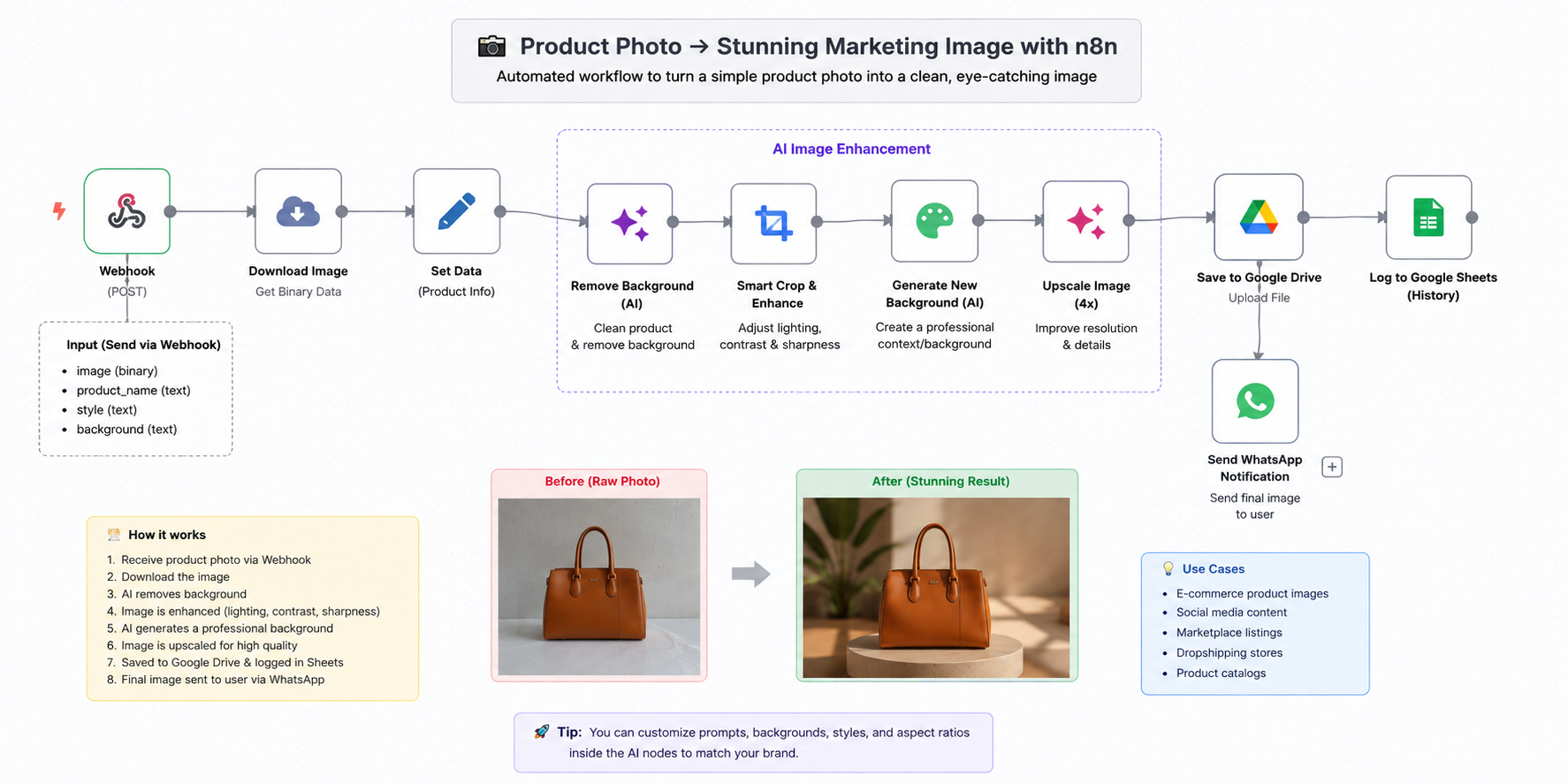
The user sends the product photo into the workflow — over WhatsApp, a webhook, or any other source. n8n picks it up and passes it through a series of AI steps automatically:
Receive the product photo 📸
The workflow takes the image along with anything else you want to pass: the product name, the kind of shot you need, the style or background you are after.
Clean the image ✨
The AI separates the product from its original background and removes everything that does not belong, leaving the product clean and clear.
Improve the quality 🎨
Lighting, contrast, sharpness and detail are all lifted, so the product reads as sharper and more professional.
Generate a new background with AI 🪄
This is the fun part. Instead of the background it came with, the AI creates one that suits the product. A bag can be placed in a high-end studio, on a marble table, or in a lifestyle scene that matches the brand.
Upscaling 🚀
Once the final image is out, it can be upscaled to raise the resolution while holding on to the product detail.
Save it automatically ☁️
n8n files the finished image on Google Drive, or whatever storage you use.
Log the run 📊
It can also record the run in Google Sheets — product name, processing time, and a link to the final image.
Send the result back 📱
Finally, n8n can send the finished image straight back to the user on WhatsApp.
So instead of a designer opening Photoshop every time to cut out the background, fix the lighting and hunt for a backdrop, you build the workflow once and let AI and n8n run the whole thing.
And the same workflow works for an online store, social media, dropshipping or a marketplace — or you can turn it into a service and sell it to shop owners.